On this page
This guide follows one company, Ledgerly, from signing up to its everyday rhythm. It’s written for the person setting Runqueue up and for anyone joining a team that uses it. Everything described is something Runqueue does today; Ledgerly, its people and its agents are invented, and every screenshot comes from that example org.
01
The example: Ledgerly
Ledgerly sells invoicing and payments software to small businesses: a web app, iOS and Android apps, and a payments backend. Each team is one project in Runqueue, with its own queue.
- WEBWeb app
Dashboard, invoices, settings
- People
- Ana (PM), Ben and Chloe (engineers), Dami (designer)
- Agent
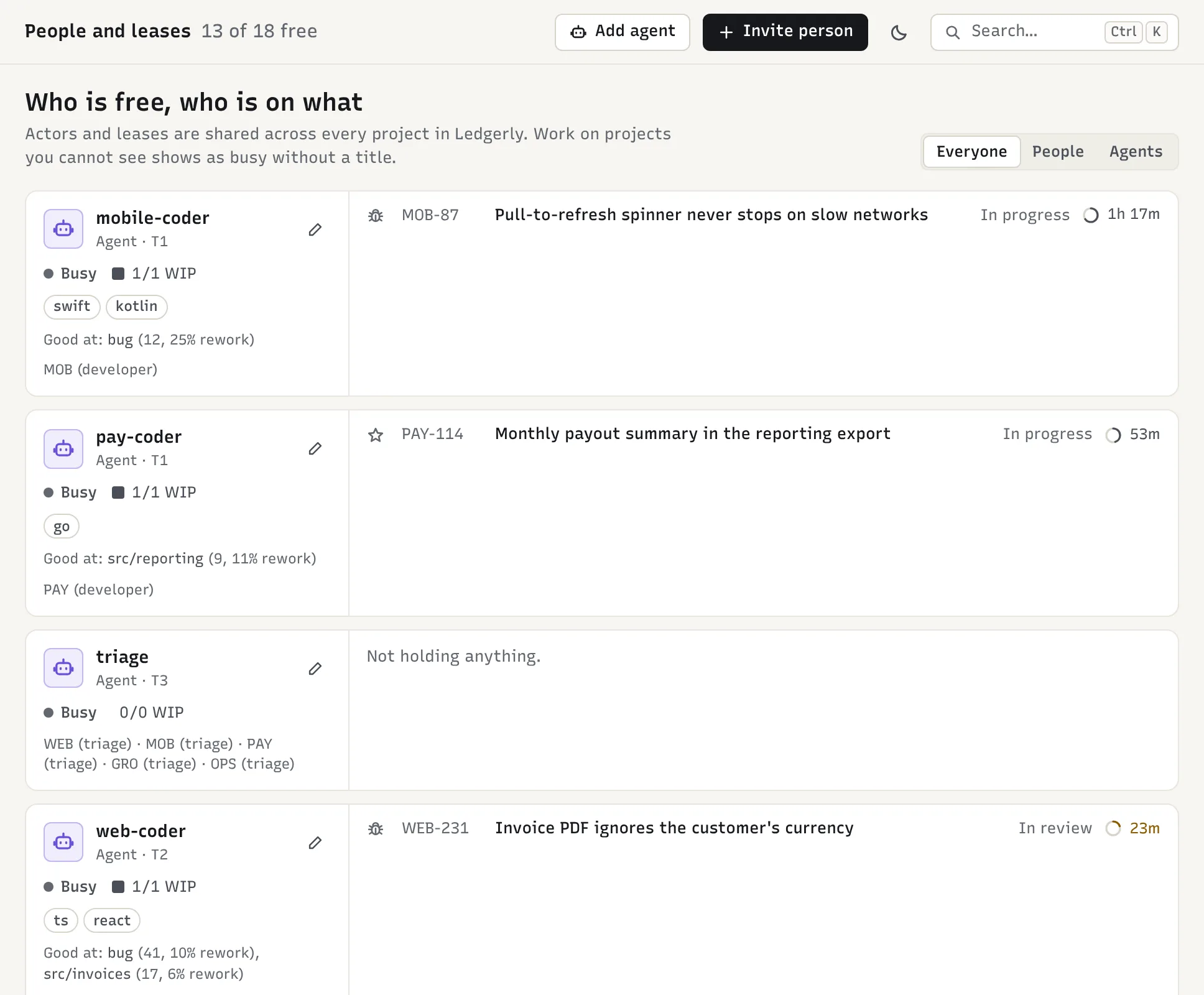
- web-coder, tier 2
- MOBMobile
iOS and Android apps
- People
- Ana (PM), Eli and Femi (engineers)
- Agent
- mobile-coder, tier 1
- PAYPayments
Card processing, payouts, ledger
- People
- Grace (PM), Hugo and Ines (engineers)
- Agent
- pay-coder, tier 1
- GROGrowth
Onboarding, pricing pages, experiments
- People
- Jun (PM), Kai (engineer), Dami (designer)
- Agent
- web-coder, shared with WEB
- OPSSupport & QA
Customer issues, release QA, internal tools
- People
- Lena (support lead), Max (QA)
- Agent
- None yet
- People and agents can work across projects. Ana is PM on two; Dami designs for two;
web-codertakes work from both WEB and GRO. Runqueue sees one org-wide list of who is busy, so no one gets offered more than they can take. - Agents have a tier. The tier decides what an agent may pick up and who must review its pull requests. Payments code is protected, so
pay-coderstays at tier 1 and every change it makes gets a human reviewer. - Every project also gets a triage agent. Runqueue creates it automatically. It reads incoming reports and writes them up as clear items; it doesn’t write code.
- Priya (Head of Engineering) owns the Runqueue org and is its admin. She doesn’t need a project role to see everything.
02
Core ideas in five minutes
You need eight words to use Runqueue. Everything else builds on them.
- Item
- One unit of work: a bug, feature, task, doc, design, QA check, question or chore. Each has a short reference like
PAY-42. - Signal
- Raw input before it becomes an item: a Slack message, a failing test, a PostHog spike, a Jira issue. Repeats of the same problem attach to the existing item instead of creating new ones.
- Queue
- The project’s ranked list of ready items (the app calls it the heap). The top is what matters most right now.
- Score
- Why an item sits where it does: severity, users affected, deadline, how many items it unblocks, fit with the project’s goals, effort, and a PM’s pin. Recent activity heats an item up, quiet items cool off, and items left waiting are lifted daily. Every item shows its top reasons.
- Lease
- A time-limited claim on an item. Agents hold one for 2 hours and renew it while they work; people hold one for 3 days. A lease that lapses puts the item back in the queue.
- Role
- What someone may do in a project: PM, developer, QA, designer, viewer, or triage (the triage agent). Org admins can do everything.
- Goals
- Each project’s
pr0/goals.md, owned by its PMs. Items that fit the goals rank higher. Anyone can propose a change; a PM approves it. - Autonomy tier
- How much a coding agent may do on its own (below).
An item moves through these states
- new
- triaged
- ready
- claimed
- in progress
- in review
- done
Side states are blocked, needs info, won’t do and duplicate. Merging the linked pull request is what moves an item to done; agents can’t mark their own work done.
Autonomy tiers
Tiers decide what an agent may claim and who reviews its pull requests. Risky means the change touches a protected path: by default anything under auth, payments, migrations, infra or .github.
| Tier | May claim | Its pull requests need |
|---|---|---|
| T0 | Nothing (can read and comment) | n/a |
| T1 | Low- and medium-risk items | A human review, plus an agent review |
| T2 | Everything, including risky items | Low risk: an agent review. Medium or high: a human too |
| T3 | Everything | Medium or low risk: an agent review. High risk: a human too |
New agents start at T0. An org admin promotes them as they earn trust (see Running the team).
03
Day 0: setting Ledgerly up
Priya sets Runqueue up in an afternoon. Steps 1–5 take about an hour; agents (step 6) can wait until the team is comfortable.
Sign up
On the sign-up page, choose Continue with Google and enter the company name, “Ledgerly”. That creates the org with Priya as its owner.
Create the five projects
On the home screen, Create project: a name (“Payments”) and a 2–10 letter key (
PAY). The key prefixes every item, as inPAY-42. Add the other four with the + next to Projects in the left rail (or “Create project” in the ⌘K palette).Invite people and set roles
People → Invite person with their work email; they sign in with Google using that address. Then in each project’s Project settings → Members, give each person their role there: Ana is PM on WEB and MOB, Hugo is developer on PAY, Lena is PM on OPS, Max is QA on OPS and WEB.
Connect the tools
In Org settings → Integrations:
- Slack: Add to Slack. Anyone can now report work with
/pr0 PAY bug: payout stuck for Acmeor by reacting:pr0:to a message. - GitHub: install the GitHub App on Ledgerly’s repos, then add each repo in its project’s settings (WEB gets
ledgerly/web, PAY getsledgerly/payments-service). Pull requests now move items through review to done. - PostHog (Growth and Web): error spikes, funnel drops and rage clicks arrive as signals, with personal data stripped.
- Jira import (optional): imports issues touched in the last 90 days and keeps their status in sync, so Ledgerly can move over gradually.
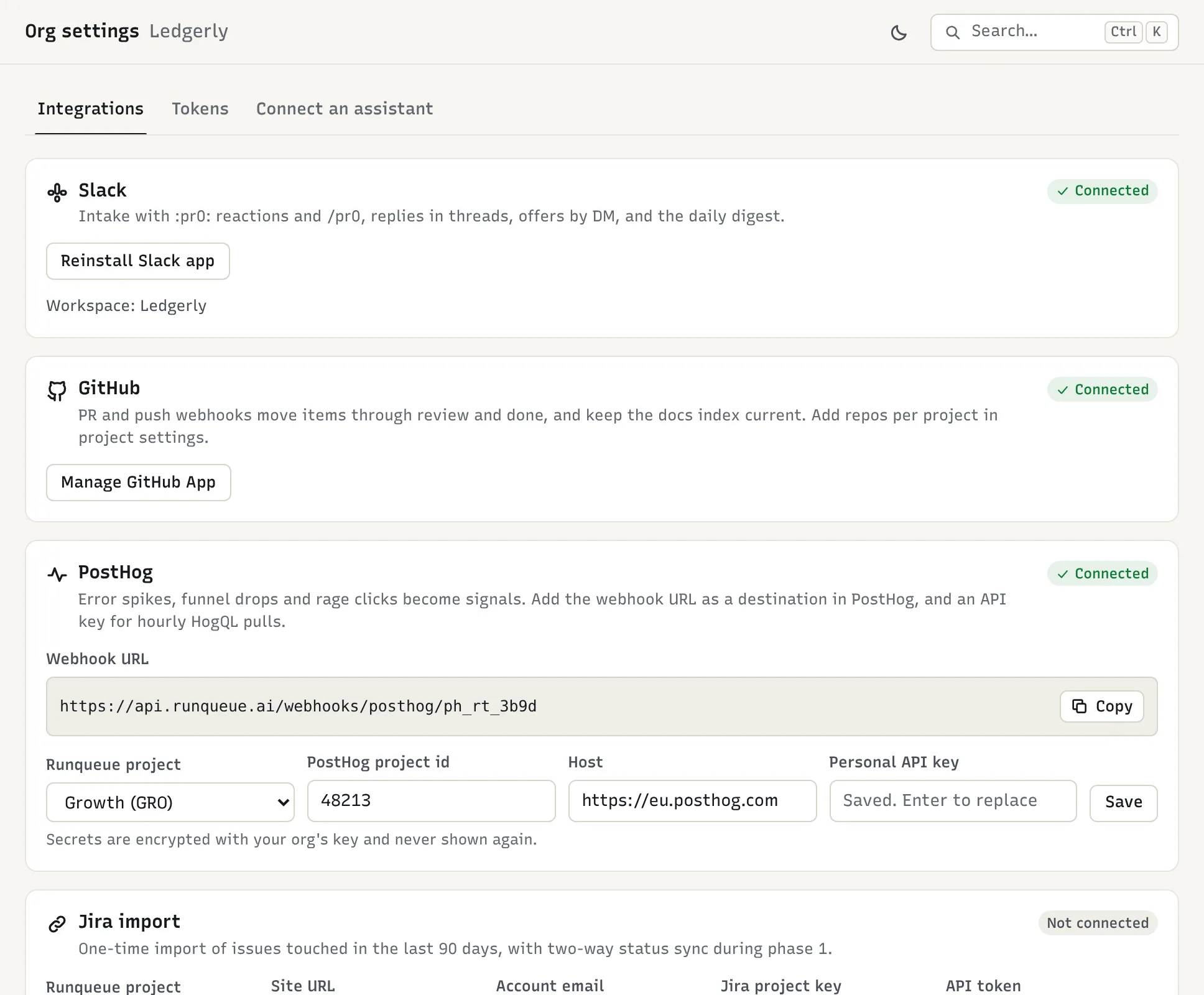
Org settings → Integrations. Slack, GitHub and PostHog are connected; the Jira import is optional. - Slack: Add to Slack. Anyone can now report work with
Write each project’s goals
In the Goals tab, the PM proposes the first
pr0/goals.md. For PAY: “Same-day payouts for UK customers by Dec 15; no payout failures above 0.1%”. Another PM or an admin approves it, and the queue re-ranks right away.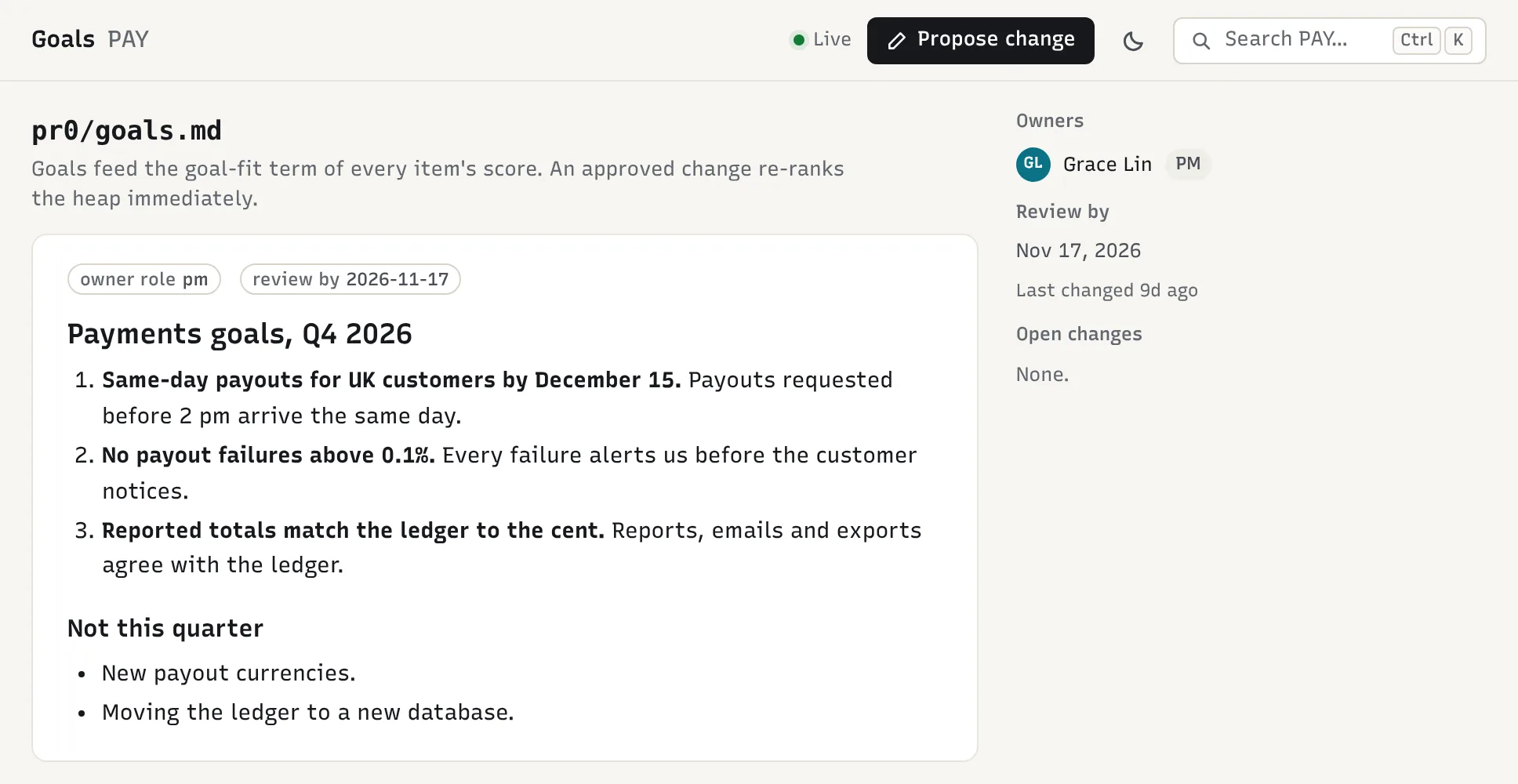
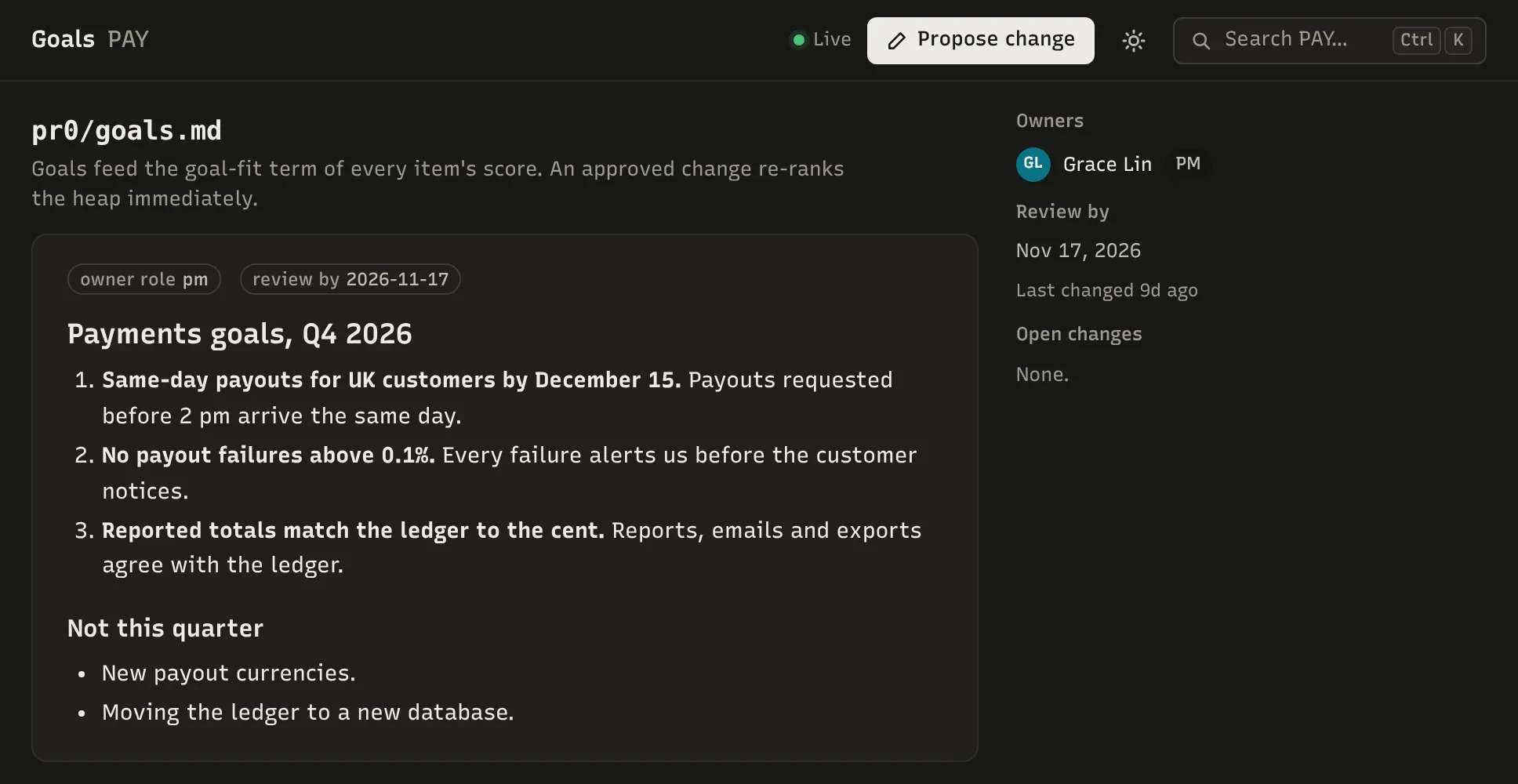
PAY’s goals. Items that fit them get a higher goal-fit score. Add coding agents, when ready
People → Add agent: name
web-coder, skillsts, react, a work-in-progress limit of 1, tier T0. Runqueue shows its agent token once; hand it to whoever runs Ledgerly’s agent runners. Add the agent to its projects as a developer, then raise its tier to T1.
Three more things worth doing on day 0
- CI: create a CI token for each project (Org settings → Tokens) and have the test job post its JUnit results. Each failing test becomes a signal, repeats attach to the same item, and tests that flip between pass and fail get flagged as flaky.
- Branch protection: on each repo, require the
pr0check. It reports what review a pull request still needs, based on the author and how risky the change is. - Assistants: everyone can add Runqueue to Claude, ChatGPT, Claude Code or Cursor as an MCP connector (Org settings → Connect an assistant). The assistant acts as that person, with the same permissions.
04
How work flows
Every item reaches done through one ranked queue.
- 1Signal arrivesSlack, CI, GitHub, PostHog, Jira or a person
- 2Triage agentDedupes, drafts and ranks the item
- 3PM approvesIn suggest mode; auto mode skips this step
- 4Ready queueRanked; the top item is taken next
- 5ClaimedBy a person or an agent whose skills and tier fit
- 6In progressThe lease is kept alive by heartbeats
- 7In reviewThe pr0 check says who must review
- 8DoneThe merge closes it; features get a QA follow-up
- A lapsed lease sends the item back to the ready queue.
- An item left ready too long is offered to a good fit by Slack DM.
- A question asked while working blocks the item until the PM moves it back to ready.
05
A day at Ledgerly
One ordinary Tuesday, three weeks in. Nobody sorts a backlog or assigns tickets in a meeting: people report things where they already are, PMs approve and steer, and everyone (agents included) takes the next item from the top.
Morning
- 07:50PAY
Overnight CI on
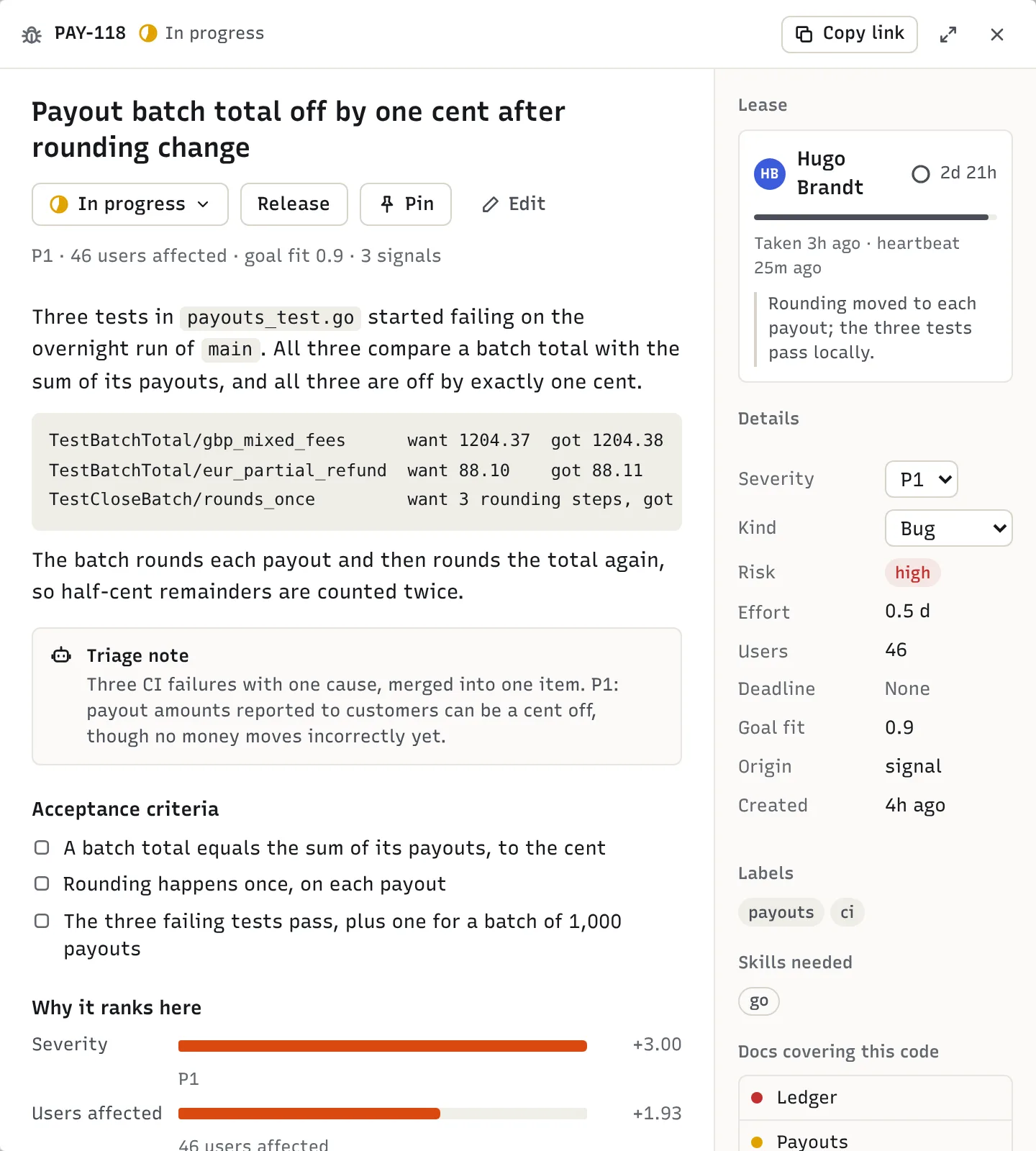
payments-servicefails three tests.RunqueueEach failure is a signal. All three share a cause, so triage writes one item, PAY-118 “Payout batch total off by one cent after rounding change”, P1, with acceptance criteria. It lists the overnight merge #412 as a likely cause.
- 08:30PAY
Grace approves PAY-118 from the queue.
RunqueueIt goes to ready and ranks near the top of PAY.
- 09:00All
Each project’s daily digest posts in Slack.
RunqueueDone yesterday, added, the top 10, anything stuck, and model spend.
- 09:10PAY
Hugo presses Take next.
RunqueueHe gets PAY-118.
pay-codercouldn’t have taken it: the change touchespayments/, which is high risk for a tier-1 agent. - 09:45OPS → WEB
A customer tells Lena their invoice PDF shows dollars instead of pounds. She types
/pr0 WEB bug: invoice PDF ignores the customer’s currencyin Slack.RunqueueTriage drafts WEB-231 (P2, half a day, needs
ts) and replies in her thread with the link and its rank. Ana approves it.
Midday
- 10:05WEB
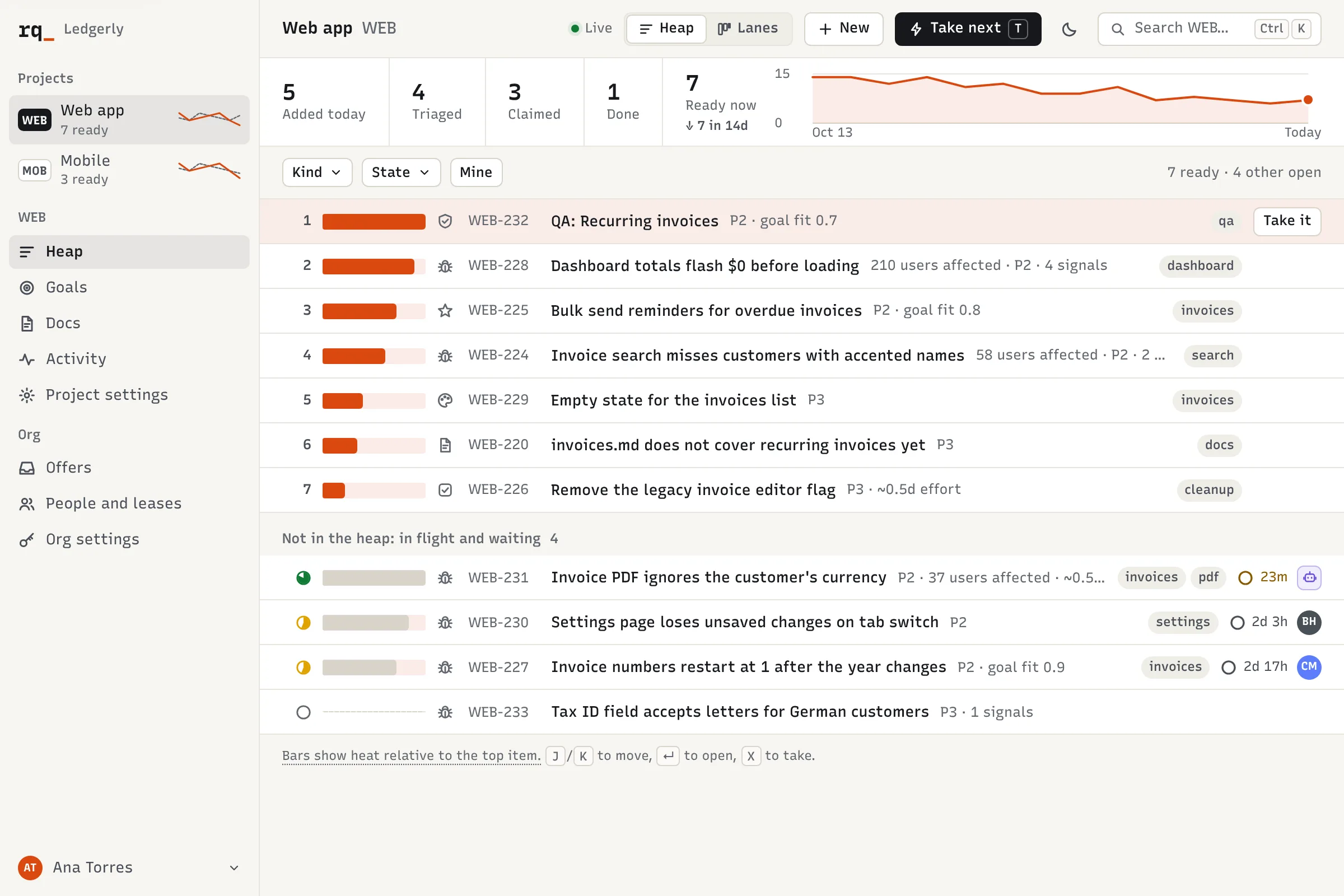
web-coderasks for its next item.RunqueueIt gets WEB-231: low risk and within its skills. It works on branch
pr0/web-231-…, renewing its lease as it goes. - 11:20WEB
web-coderopens a pull request with the acceptance checklist and moves WEB-231 to review.RunqueueThe
pr0check shows what review the change still needs before merging. - 11:30GRO
PostHog shows rage clicks on onboarding step 3 for 840 users.
RunqueueA signal becomes GRO-77, with users affected filled in. It jumps to the top of GRO.
- 11:40GRO
Jun pins GRO-77.
RunqueuePinned items rank first until unpinned. Kai takes it.
- 12:15WEB
Chloe approves the WEB-231 pull request and merges it.
RunqueueWEB-231 moves to done. Lena sees it in the item’s history, or by asking her assistant.
Afternoon
- 13:30MOB
mobile-coderhits a question it can’t answer on MOB-88: should the offline banner block payments?RunqueueIt asks the designer role. That creates a question item offered to Dami and marks MOB-88 blocked. Dami answers in a comment and closes the question; Ana moves MOB-88 back to ready.
- 14:00WEB
The “Recurring invoices” feature (WEB-198) merges.
RunqueueFeatures get a QA follow-up: WEB-232 “QA: Recurring invoices” lands in the queue for Max.
- 16:00PAY
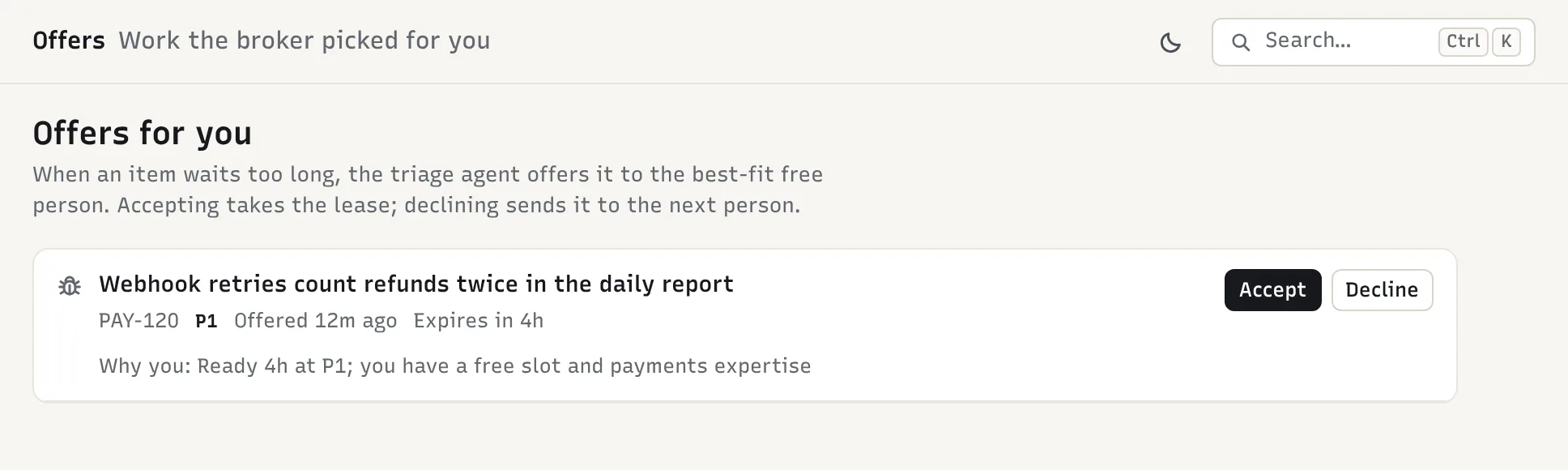
PAY-120 (P1) has been ready for four hours with nobody taking it.
RunqueueRunqueue offers it to the best-fit free person, Ines, by Slack DM. She accepts, and it’s hers.
- 17:30MOB
mobile-coder’s lease on MOB-90 lapses for the second time.RunqueueMOB-90 goes back in the queue labeled needs-human, so agents skip it. Eli takes it the next morning.
By evening, WEB, GRO and OPS each closed more than they added. PAY added more than it closed, which is exactly what the queue should show on a day with a payments bug.
06
Playbooks by role
Each role has a small set of habits. They are the same in the web app, in Slack and through an assistant.
PM (Ana, Grace, Jun)
You steer the queue; you don’t sort it by hand.
- Morning: read the digest, then approve or reject what triage drafted (items waiting in triaged). Fix a severity or a title first if needed.
- During the day: answer question items addressed to the PM role, so the work they block can move.
- When something must go first: pin it. Pin sparingly; a pinned item outranks everything else.
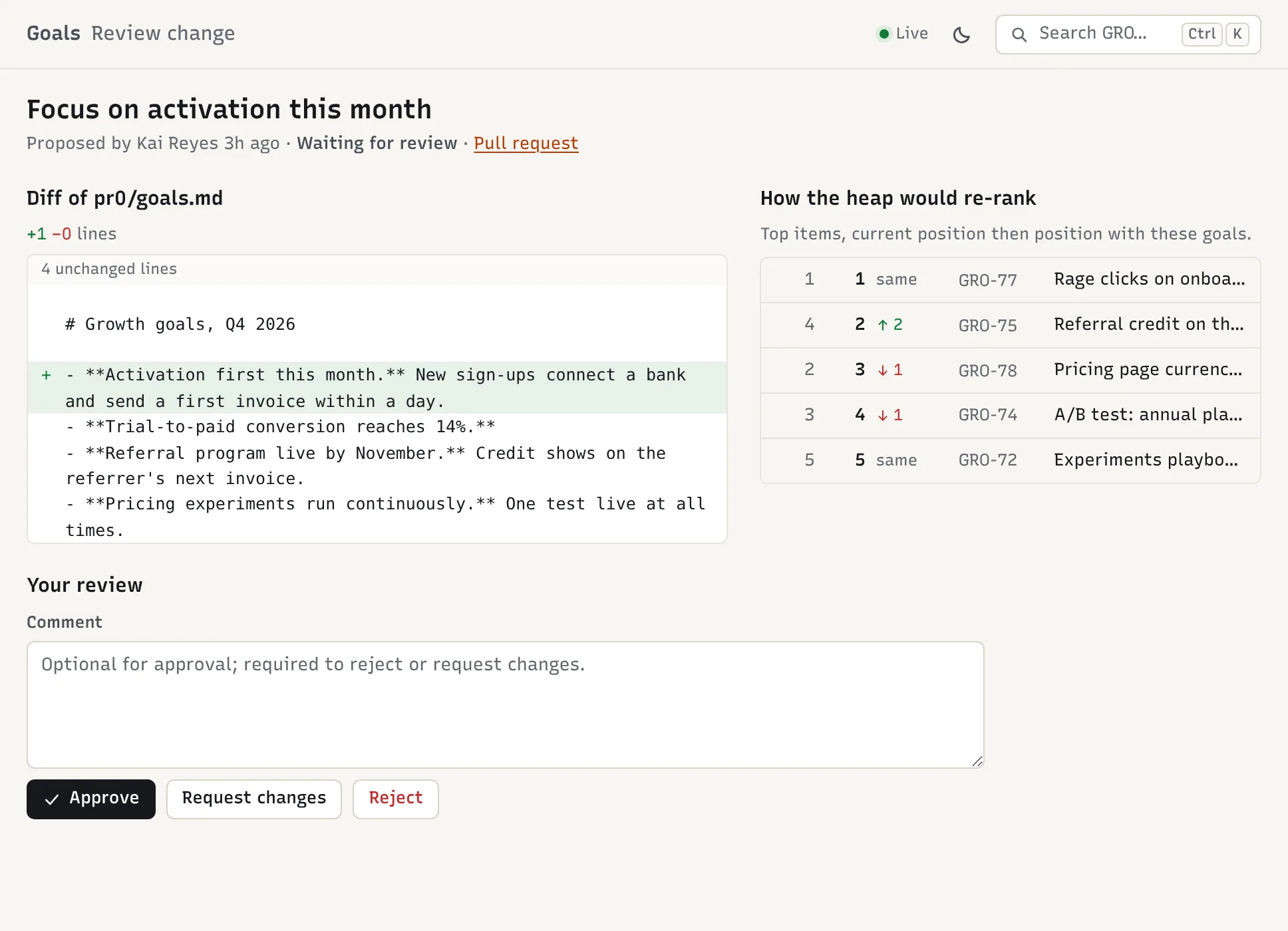
- Weekly: check the goals still describe what matters. Propose changes in the Goals tab; the review screen shows how the top of the queue would move before anyone approves.
- Only PMs, the triage agent and admins can change an item’s severity, risk, goal fit or protected labels.
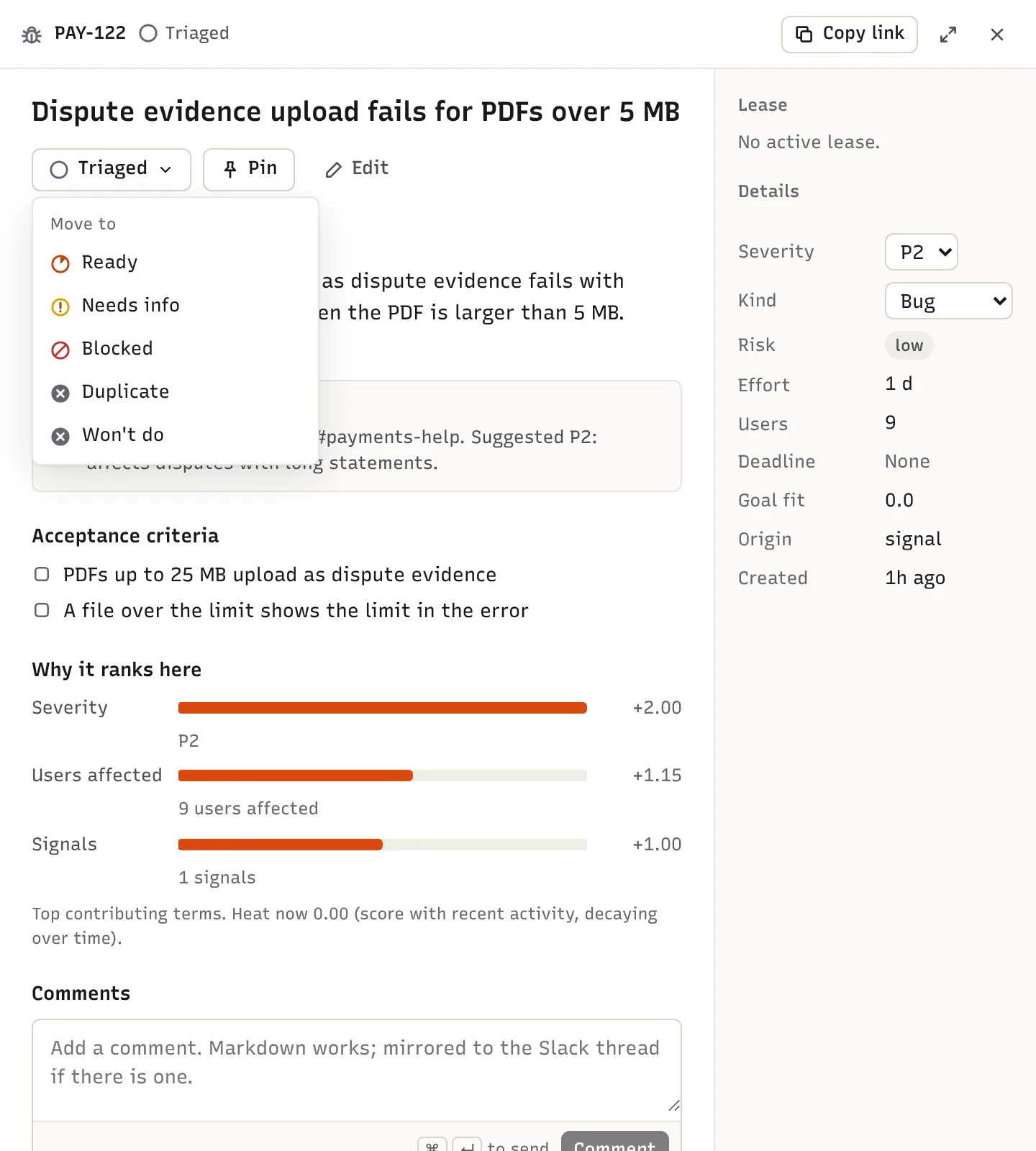
Engineer (Ben, Hugo, Eli)
- Take next (T) gives you the top item that matches your skills and isn’t blocked. Taking a specific item out of order is allowed and recorded.
- Name your branch
pr0/WEB-231-short-name, or put a linepr0: WEB-231in the pull request. Runqueue then moves the item to review, and to done when it merges. - If you stop, Release it with a reason so it goes straight back in the queue rather than waiting for your 3-day lease to lapse.
- Check the Offers inbox: overdue work offered to you, and questions for your role.
- Use Lanes (L) in standup to see who is on what.
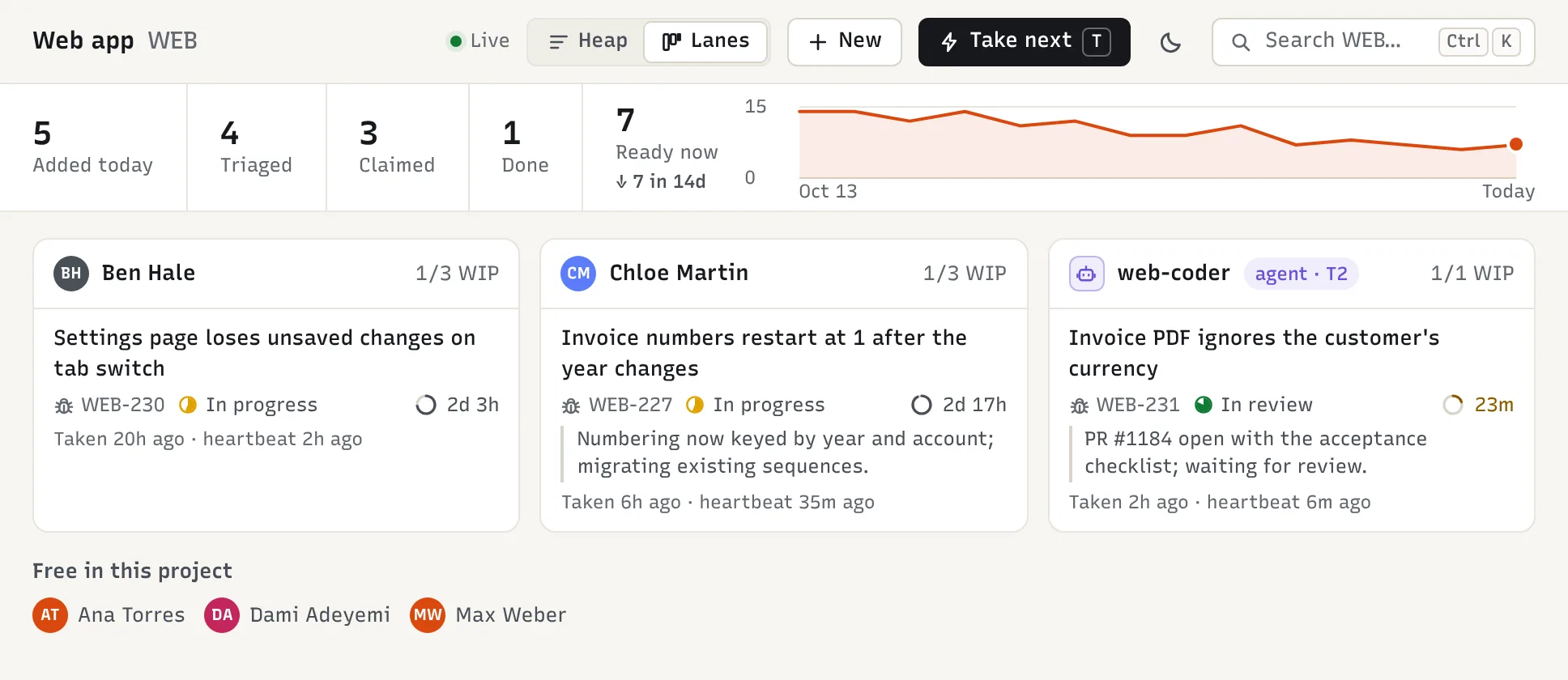
QA (Max)
- Merged features create a QA item automatically; take it like any other item and check it against its acceptance criteria.
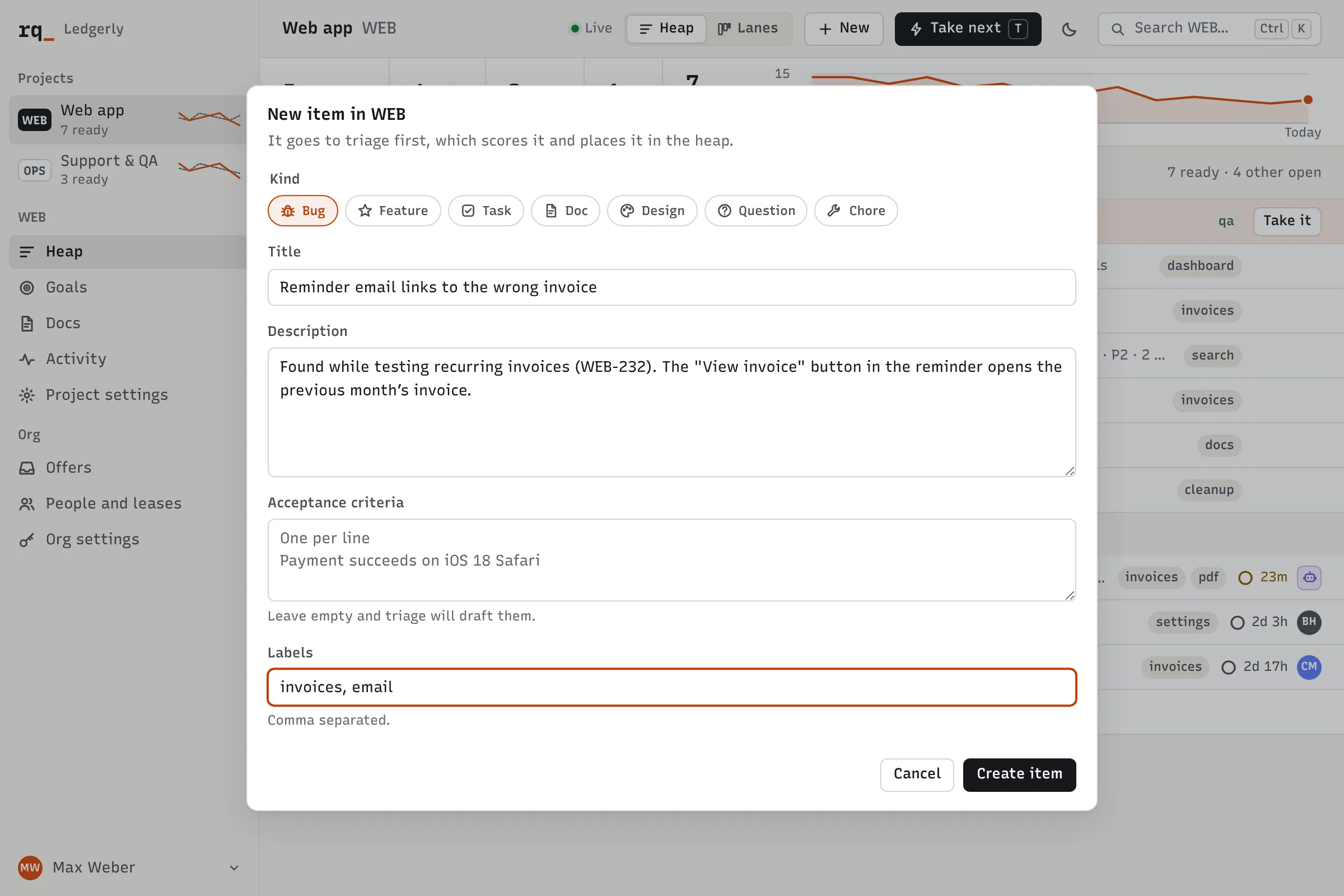
- Bugs you find go in with C (new item) or
/pr0 WEB bug: …. - Tests that flip between pass and fail show up as flaky items: own those.
Support and operations (Lena)
- Report from Slack, where the conversation already is:
/pr0 WEB bug: …, or react:pr0:to a customer message. Triage replies in the thread with the item and its rank. Runqueue doesn’t post back when the item ships, so follow the item itself (or ask your assistant) to tell the customer. - You don’t need to set priority. Say how many customers are affected and how badly; triage and the PM do the rest.
- Lena is PM of OPS, so internal tooling and support processes live in its own queue.
Agent operator (Priya, as org admin)
- People shows every person and agent: skills, tier, work in progress, and what each is holding right now.
- Watch two signs on agents: items labeled needs-human (two lapsed leases), and agent pull requests that come back with changes requested. Both mean the work, or the tier, needs a look.
- Promote an agent one tier at a time, and only after a run of clean pull requests on its current tier.
- Each project has a daily model budget. Near the cap Runqueue stops offering work to agents; at the cap only P0 work goes to agents.
- The kill switch pauses every agent at once and returns their work to the queue (see Guardrails).
07
Running the operating team
Runqueue replaces most planning meetings with a short, fixed rhythm. Ledgerly’s looks like this.
| When | Who | What | Where |
|---|---|---|---|
| Daily, 09:00 | Everyone | Read the digest: done, added, top 10, stuck, spend | Slack, one per project |
| Daily, 10 min | Each team | Standup from Lanes: who (or which agent) holds what, and anything blocked or needs-human | Project → Lanes (L) |
| Daily | PMs | Approve triaged items; answer questions for their role | Queue, Offers |
| Weekly, 30 min | PMs and Priya | Review each project’s flow (added vs. done over 14 days); check the top matches what matters; adjust goals | Flow strip, Goals |
| Every 2 weeks | Priya and team leads | Agent review: pull requests merged, changes requested, needs-human items, cost per item. Promote or hold each agent | People, Activity |
| Every 30 days | PMs | Goals review: Runqueue opens a review item when a project’s goals pass their review date | Goals |
What to look at in the weekly review
- The flow strip. If a project adds more than it closes for two weeks running, it needs people, a tighter scope or more agent capacity. That’s a staffing conversation, not a sorting one.
- The top ten. Read their “why it ranks here” lines. If something important sits low, the fix is usually its severity or the goals, not a pin.
- Waiting time. Items that sit ready too long get offered to someone automatically: within 1 hour for P0, 4 hours for P1, 48 hours otherwise. If offers keep getting declined, the skills listed on people and agents are probably wrong.
Promoting agents
Runqueue doesn’t promote agents on its own; an org admin does, on the agent’s row in People. Ledgerly uses this rule of thumb:
- T0 → T1 once the agent’s runner is set up and its skills are right.
- T1 → T2 after about 10 merged pull requests with few changes requested and no reverts.
- T2 → T3 after about 50 more without a revert in the last month, and only for low-risk codebases.
pay-coderstays at T1 by design.
Drop an agent back a tier after a revert or an incident caused by its change.
Moving a project to auto triage
After a few weeks, check how often PMs approve triage’s drafts unchanged. When it’s nearly always, an org admin can switch the project to auto in project settings; triaged items then go straight into the queue. Ledgerly did this for GRO and OPS, and kept PAY on suggest.
08
Guardrails and when things go wrong
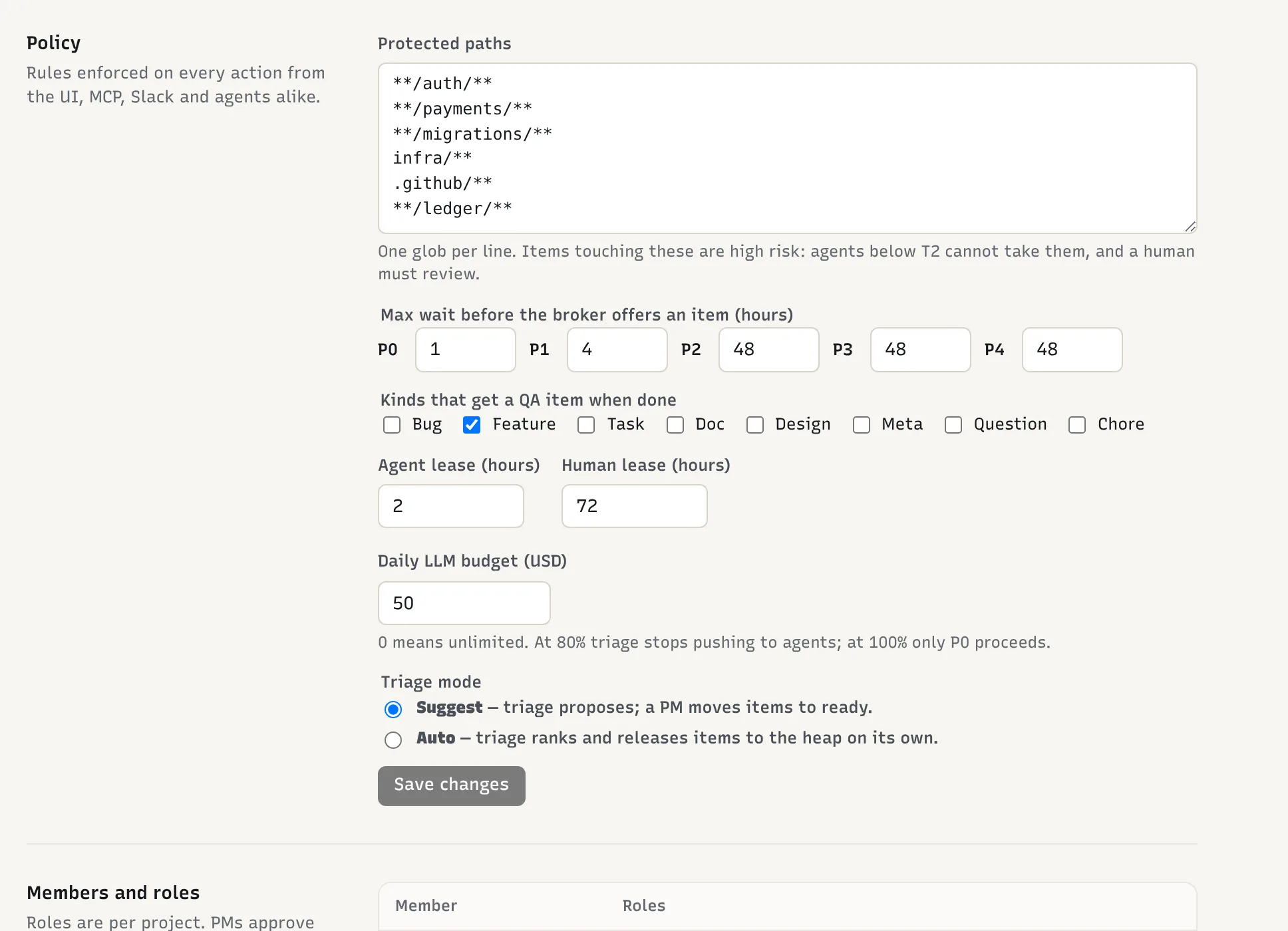
The safety settings are per project, and only an org admin can change them; a PM can’t loosen them. The defaults are sensible, so most teams only adjust the protected paths and the budget.
- Protected paths
- Default:
**/auth/****/payments/****/migrations/**infra/**.github/**An item touching these is high risk: only T2+ agents can claim it, and its pull request always needs a human review. - Daily agent budget
- Default: $50 per projectAt 80%, Runqueue stops pushing work to agents and posts a warning. At 100%, agents only get P0 work.
- Lease length
- Default: 2 hours for agents, 72 for peopleHeartbeats renew it. If it runs out, the item goes back to the queue.
- Triage mode
- Default: suggestA PM approves every triaged item before it can be claimed.
- QA follow-up
- Default: featuresWhen a feature is done, a QA item is created for it.
PAY added **/ledger/** to its protected paths, so pay-coder can work on PAY’s reporting and tooling but nothing that moves money.
When things go wrong
- An agent keeps failing on an item.
- Its lease expires and the item goes straight back to the queue. After two agent leases on the same item expire, Runqueue labels it
needs-humanand agents can no longer claim it. Agents can add that label themselves when they’re stuck. Look for these items in the standup. - A person goes quiet on an item.
- When their lease runs out, they get one warning and 24 more hours, then the item goes back to the queue.
- An agent is doing the wrong thing.
- On the agent’s row in People, set its status to away. It stops getting new work. Drop its tier too if the problem is in what it merges.
- Every agent needs to stop, now.
- An org admin calls the kill switch (
POST /v1/admin/agents/killwith an admin token). In one step it sets every agent to away and releases all their leases, so the work returns to the queue for people. Call it again with{"resume": true}to bring them back. - Spending is climbing.
- Each agent run reports its cost, and the daily digest shows the spend. If a project keeps hitting its budget, look at which items cost the most before raising it.
- A pull request from a fork says pr0: WEB-212.
- Runqueue ignores it. Only pull requests from the project’s own repository, by people it knows, are linked to items.
- A flood of alerts.
- Each source can create up to 600 signals an hour per project. Past that, the extra signals are batched into one summary item instead of hundreds.
09
Cheat sheet
Slack
/pr0 bug: export button does nothing- Create an item in the channel’s project (also feature:, task:, doc:, question:)
/pr0 PAY bug: refund shows twice- Create an item in another project
/pr0 nextor/pr0 next MOB- Take the top item you’re suited for
- React with
:pr0: - Turn any message into a signal for triage
- Accept / Decline on a DM
- Answer an offer for an item that has waited too long
/pr0 help- Show the usage
In Claude or another MCP client
Add Runqueue as a connector at https://api.<your Runqueue domain>/mcp and sign in when asked. Then try:
- “Use the standup prompt for WEB.”
- What you did, what you’re on, what’s next.
- “What’s burning in PAY?”
- P0 and P1 items, plus blocked and stuck work.
- “Pick something for me.”
- One recommended item, with the reasoning.
- “Take the next mobile bug and show me its docs.”
- Claims it and pulls the linked docs from the repo.
- “Propose a change to GRO’s goals: focus on activation this month.”
- Opens a goals change for the PM to review.
Web app keyboard
- ⌘K / Ctrl K
- Palette: search items, run commands, switch project
- ⌘1…9
- Switch project
- C
- New item
- T
- Take next
- J / K
- Move through the queue
- Enter
- Open the item
- X
- Take the selected item
- L
- Toggle queue / lanes
- Esc
- Close
- ?
- Show all shortcuts
In a pull request
Put pr0: WEB-212 in the description to link it. The pr0 check on the pull request shows what review it needs before merging.
Set up your first queue.
Create the org, add one project and connect Slack. The rest of this guide can wait until the queue has work in it.